
Any T-Mobile customer who receives this text is going to label it suspicious immediately. Why wouldn't they? Not only does it seem like a smishing scam (a "smish" is a fake text that is made to look legitimate and is sent to try and obtain personal information from the recipient/victim), but the text is worded in a way that the person receiving it feels that he is being manipulated into responding to it immediately. That is something you would normally see from a text related to a smishing scam.
One T-Mobile subscriber called the company and was told that the text is legit
Other T-Mobile subscribers on social media admitted that they too had received the same text message. One said that he called T-Mobile and found out that the text is 100% legitimate. Surprising, isn't it? This T-Mobile subscriber also heard from the carrier that it had been receiving calls all day from customers who couldn't tell whether the text was real or fake. The subscriber also found out from the rep that he spoke with that his account was secure and there was no reason for him to follow the directions listed in the text to update his PIN, email, and security questions.
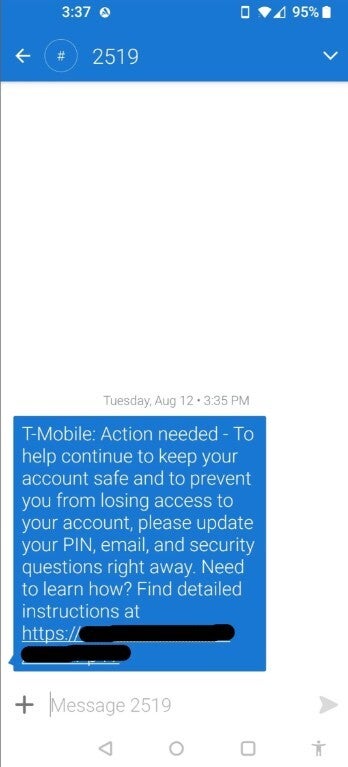
When he asked the customer service agent why the text said he needed to update his info as soon as possible, the agent didn’t have a legitimate answer for him. Also interesting, a Reddit subscriber with the username cypressf pointed out that the link in the text redirects to a T-Mobile support page titled, "Protect your T-Mobile account from fraud." That support page can be read by tapping on this link. He feels that T-Mobile sent the text out by mistake, or the carrier was able to find a real malicious attack against its customers but has not properly explained the situation.
Freezing your SIM can end your worrying about being the victim of a SIM Swap
This T-Mobile customer took defensive action, a wise move. He froze his SIM card to prevent SIM swapping and unauthorized porting. This locks the SIM in his phone to his current phone number. The number cannot be transferred to a new device or carrier without the account owner unfreezing the SIM using a high security verification process. Thus, he can't be the victim of a SIM swap. Another T-Mobile subscriber who also received the text said that it looked legit, but still, he wouldn't use the link that is included in the message.
If you received this text, what did you do?
Earlier in this article, we told you that a call to T-Mobile made by one recipient revealed that the text was indeed sent by the wireless provider. However, another Redditor with the username RoadTripWest said that he got the same message for his T-Mobile pre-paid account and when he called customer service, the agent called it a scam. That seems unlikely after others on Reddit said they called T-Mobile and was told it was real.
Did you receive the text from T-Mobile? This s what you should do
One T-Mobile rep on Reddit said that he saw in his system a message that pre-paid subscribers would be receiving a message to update their account PIN. Of those who received the text and revealed what kind of account they had, all said that they have a "pre-paid" plan. This is another reason why we should consider the text to be legitimate.
So, is this a real text or is it a dangerous smishing text designed to steal subscribers' personal information? It appears to be a real text. Having said that, I would agree that you should not tap on the link at the end of the text. However, you should update your PIN, email, and security questions.