What Adaptive Connectivity does for your Pixel
The feature automatically manages your network connections. In the latest Android 16 QPR3 Beta 2 release, Google took Adaptive Connectivity and changed the design of the page and how it works by adding a couple of toggles to the page. Both toggles are enabled by default. The toggles say:
- Auto-switch to mobile network-Ensures connectivity when Wi-Fi is poor or unavailable. Data charges may apply.
- Optimize network for battery network-Automatically selects the best network connection to extend your battery life.
The first toggle will automatically switch you from Wi-Fi to your mobile network when the Wi-Fi signal you have is not strong enough to give you a good quality connection or even keep you connected. The problem with this is that by switching to mobile data, it could eat up the amount of premium data you are allowed on your plan each month. Thus, Google added the toggle to allow you to disable the feature if you'd rather go Wi-Fi or bust.
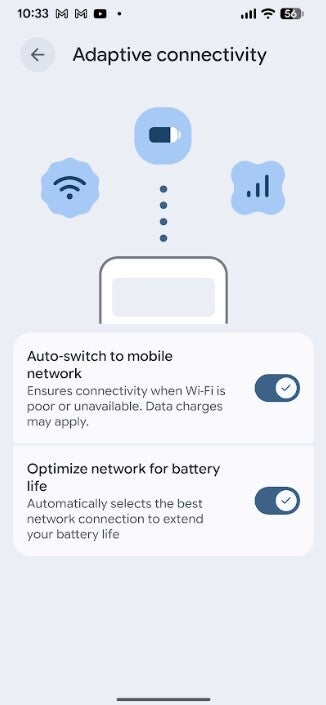
The new version of the feature is available now on Android 16 QPR3 Beta 2
The second option really doesn't have a downside to it, which means you're probably likely to keep this setting enabled at all times. It looks for the best network connection that is likely to extend your battery life. What smartphone user wouldn't want to extend his battery life?
Is this a feature you are happy to have on your Pixel?
I can tell you that the updated version of Adaptive Connectivity has appeared on my Pixel 6 Pro running Android 16 QPR3 Beta 2. If you are running this version of Android on your Pixel, you will have the version of Adaptive Connectivity with the two toggles. Both will be toggled on by default. To reiterate, if you do have a limited amount of premium data each month, you might want to consider disabling the first toggle.
There should be just one last beta version of Android 16 QPR3 before the stable version is released sometime next month.