There's a new look for the Screen Recording feature in Android 17
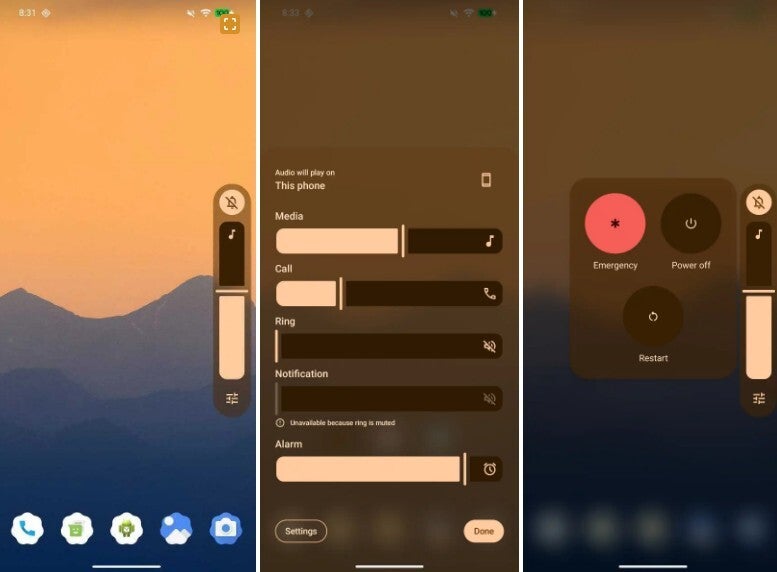
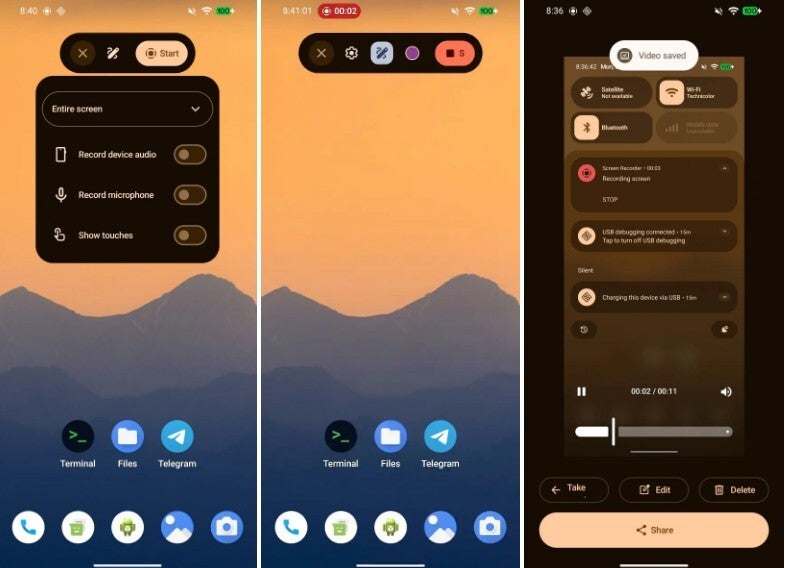
The power menu will be translucent on Android 17 and with the background blurred out, the app icons on the bottom of the screen cannot be identified. The Android 17 screen leaks come from X subscriber @RKBDI. Another leak showed a new look for screen recording. The current UI is a bit chunky and clunky with Quick Settings in the background. In Android 17, this feature uses a floating pill. Tap on "Entire screen" and that brings up these options: "Record device audio, Record microphone, and Show touches."
The status bar timer is still part of the new look screen recording UI, and a tap on the screen while recording brings back the pill. Eventually, a preview screen surfaces from where you can edit or share the on-screen recording you've made.
Quick Settings and the Navigation Shade are getting separated in Android 17
Android 17 has the codename of "Cinnamon Bun," and among the changes we expect to see is the separation of Quick Settings and the Notification Shade. Currently, swiping down from the top of the display shows you Quick Settings panels on top with notifications underneath. In Android 17, these Siamese twins can be broken up by going to Settings > Notifications.
Our first look at Android 17 will take place at Google I/O in May
Another couple breaking up in Android 17 is the Internet and Wi-Fi toggle in Quick Settings. Google brought together these love birds in Android 12 to prevent a user from accidentally completely disconnecting his/her phone. The new layouts being tested will load faster while offering one-tap access. This way, if someone does disconnect their phone by accident, it can quickly be reset by enabling the proper connectivity toggle.
We expect the public to get its first look at Android 17 in May during Google I/O, with a stable release of Android 17 coming in June.